Understanding the Interface
A Clean, Focused Design
Ubiquity's interface is intentionally simple — it's built to help you find files fast without any distractions. There are no cluttered menus or overwhelming options. Everything you need is right in front of you.
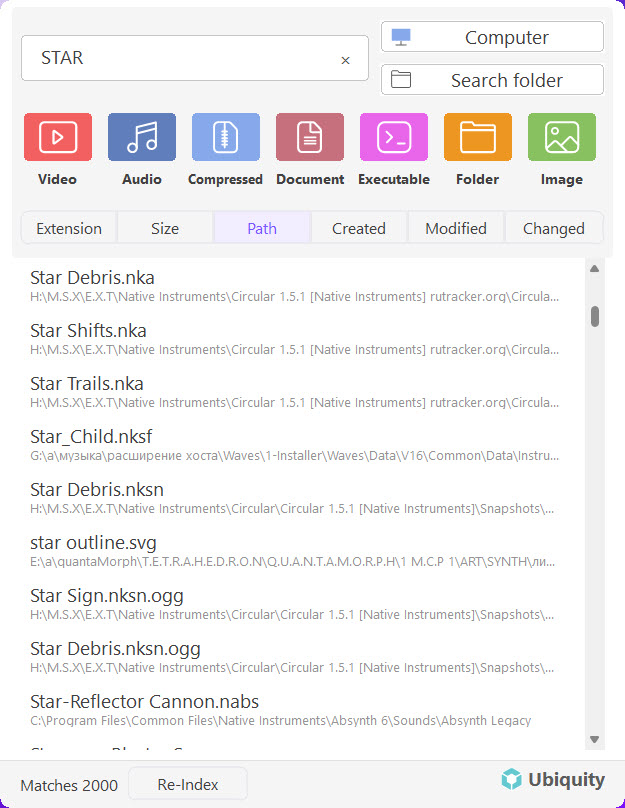
Interface Overview
The Ubiquity window is divided into a few simple areas. Here's a breakdown of what each part does:
-
Search Bar
This is where you type your query. As soon as you start typing, Ubiquity begins searching through your indexed files and displays matching results in real time. -
Results List
Below the search bar you'll see a list of files that match what you've typed. Each result shows the file name, its location on your drive, and a small icon indicating the file type. -
Quick Actions
Hover over any result to reveal quick action buttons. You can open the file directly, open the containing folder, or copy the file path to your clipboard.
Keyboard-First Design: Ubiquity is built for keyboard lovers. Use ↑ and ↓ to navigate results, Enter to open the selected file, and Esc to dismiss the window.
Launching Ubiquity
There are two quick ways to bring up the Ubiquity search window:
- Keyboard shortcut: Press Ctrl + Space anywhere on your desktop to pop open the search bar instantly.
- System tray icon: Click the Ubiquity icon in your Windows system tray (bottom-right corner of the taskbar).
Once the window appears, just start typing — no extra clicks needed.
Reading the Results
Each search result in the list tells you everything you need to know at a glance:
- File name: The name of the matching file, with your search terms highlighted.
- File path: The full location on your drive so you always know where the file lives.
- File type icon: A small icon that shows whether it's a document, image, folder, or other file type.
Quick Action Buttons
- Open: Launches the file in its default application.
- Open Folder: Opens File Explorer directly to the folder containing the file.
- Copy Path: Copies the full file path to your clipboard for easy pasting.
Staying Out of Your Way
One of the best things about Ubiquity is that it stays out of your way. The search window is lightweight and closes automatically when you click elsewhere or press Esc. It doesn't hog your taskbar or clutter your screen — it only appears when you need it, and disappears when you're done.
Minimal by Design: Ubiquity keeps things simple on purpose. With just basic search functions and a clean layout, you'll never feel lost or overwhelmed. It's search the way it should be.
Next Steps
Now that you know your way around the interface, here are some helpful articles to explore:
- First Launch & Initial Setup — Get up and running for the first time
- Basic Search Tips — Simple tricks to search even faster
- Installing Ubiquity on Windows — If you haven't installed it yet