Search Not Finding Expected Files
Why Your File Might Not Appear
Ubiquity searches only files that have been indexed. If you created a new file, renamed an existing one, or moved files to a new location, those changes won't appear in search results until the index is updated. This is normal behavior — the index is a snapshot of your file system, not a live view.
Common Scenarios
Here are the most common situations where a file won't show up in search:
Files That May Be Missing from Search
- Newly created files. A file you just saved may not be indexed yet.
- Renamed files. If you changed the file name, the old name is gone from the index and the new name hasn't been added yet.
- Moved or copied files. Files moved to a new folder won't appear under their new path until the next index update.
- Files outside indexed locations. Ubiquity only searches folders you've added to the index. If a file is in a location that isn't indexed, it won't appear.
How to Fix It
In most cases, you just need to give the index a moment to update — or trigger a manual reindex. Here's what to do:
-
Wait a moment.
Ubiquity updates the index in the background. If you just created or renamed a file, wait a few seconds and try the search again. -
Check your index locations.
Open the Ubiquity settings and verify that the folder containing your file is included in the index. If it isn't, add it. -
Trigger a manual reindex.
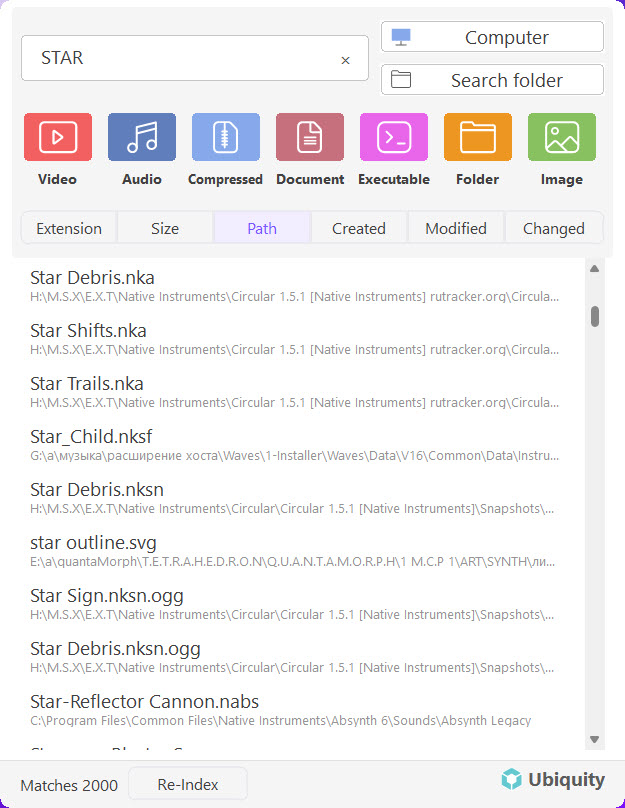
If waiting doesn't help, open Ubiquity's settings and click Reindex. This forces the index to scan your indexed locations and pick up any new, renamed, or moved files. -
Verify the search query.
Double-check that you're searching for the correct file name or keyword. Remember, Ubiquity searches file names and metadata — if the name changed, search for the new one.
Tip: A manual reindex is usually very fast — it only needs to scan for changes, not rebuild the entire index from scratch.
When to Reindex
You should reindex whenever you expect a file to be searchable but it isn't. The most common triggers are:
- You just created or downloaded a file.
- You renamed or moved a file.
- You added a new folder to your file system that should be searchable.
- Ubiquity was closed or restarted after a system update.
Note: The index also updates automatically on a regular schedule. Reindexing manually is only needed when you need immediate results.
Still Not Working?
If you've reindexed and the file still doesn't appear, check that the file isn't corrupted, that it's in a supported format, and that it's not hidden or marked as a system file. If the problem persists, contact our support team for further help.
Next Steps
Learn more about how Ubiquity's index works:
- Setting Up Your First Search Index — How to configure and manage your index
- Instant File Search & Filtering — Get the most out of your searches
- Understanding the Interface — Full walkthrough of the Ubiquity layout